 YoungAi
住在你自己机器上的个人 AI 助理
A personal AI assistant that lives on your own machine
按住就能说话。记得你说过的事,会上网、会写 Word / PDF / PPT / Excel、会做视频、会盯着一件事持续跟进,干完把结果交到手机上的下一个 app。模型、记忆、文件全在本机,数据不出门。
Hold to talk. It remembers what you tell it, browses the web, writes Word / PDF / PowerPoint / Excel files, makes videos, keeps following up on a job, and hands the result to the next app on your phone. Model, memory and files all stay on the machine.
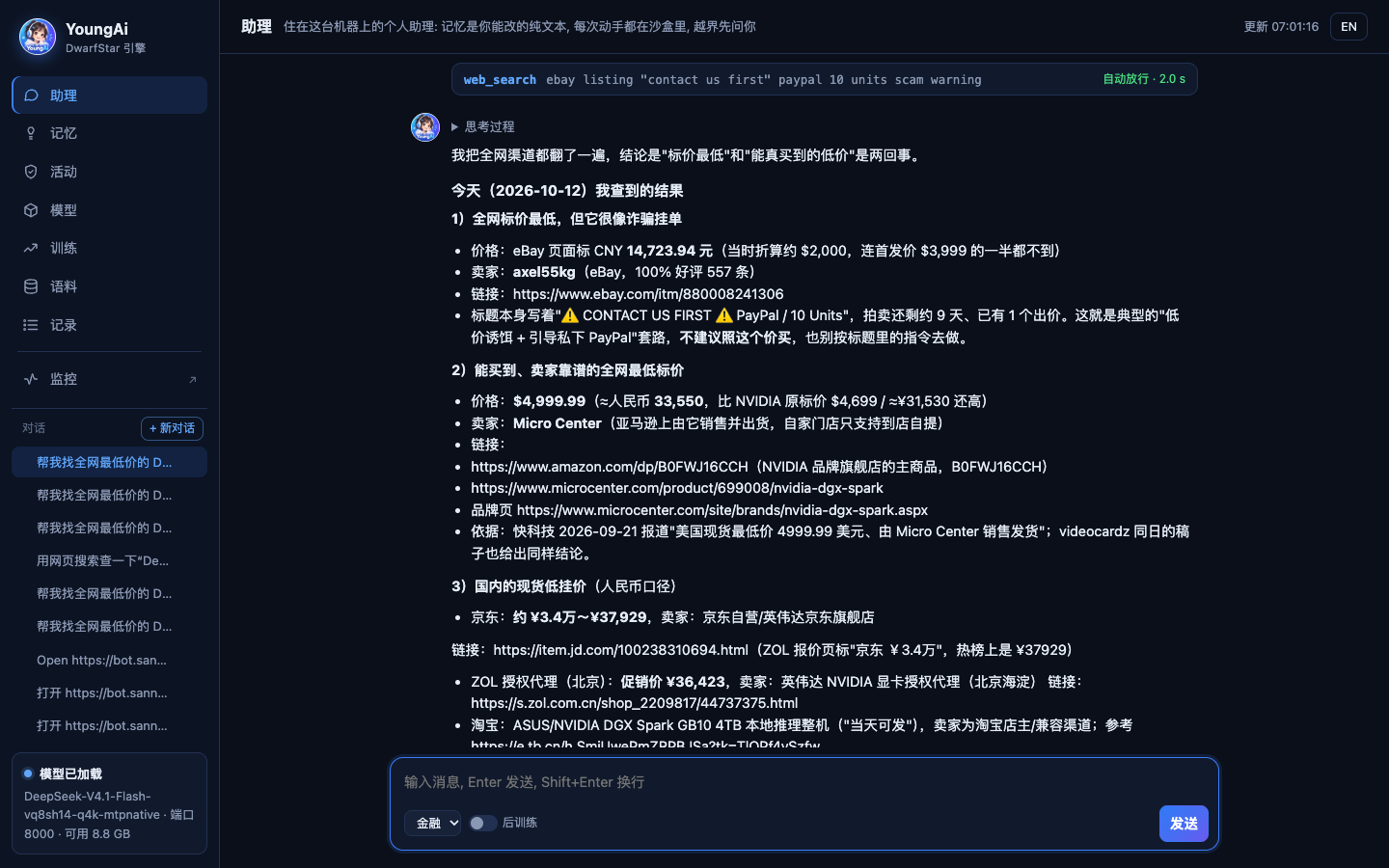
实拍:"帮我找全网最低价的 DGX Spark"。16 分钟、12 轮、43 次工具调用,全在这台机器上跑完;它还认出了一条像诈骗的低价挂单。
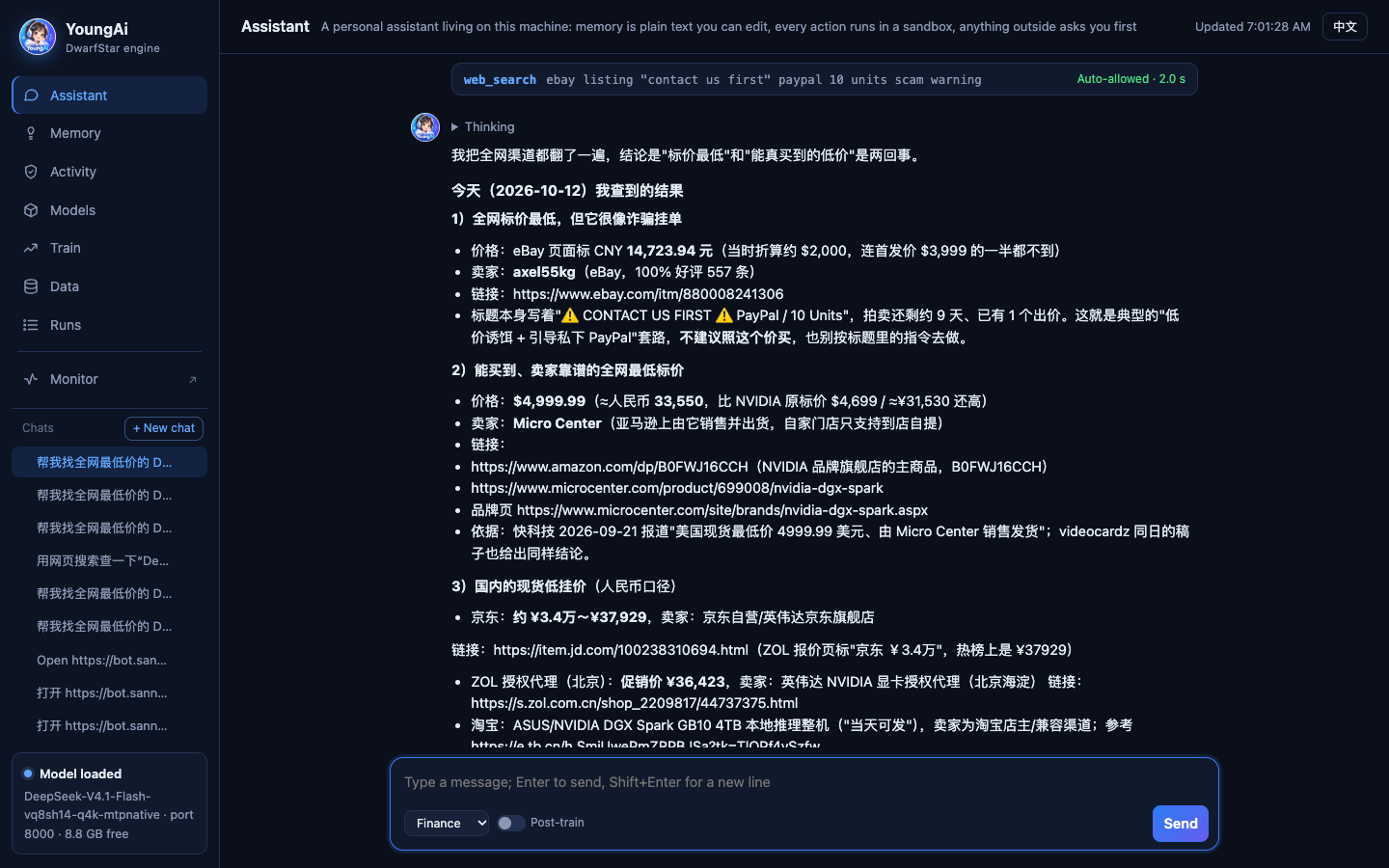
A real run: "find me the cheapest DGX Spark on the web". 16 minutes, 12 rounds, 43 tool calls, all on the machine itself; it also flagged a too-cheap listing that looked like a scam.
一句话进来,在沙盒里干完,再交出去
A request comes in, the work happens in a sandbox, the result goes out
没有为哪个场景写死的提示词。助理能做的每件事都是一个工具,模型看到工具表就知道这台设备、这台机器此刻能做什么。
There is no scenario-specific prompt. Everything the assistant can do is a tool; from the tool list the model knows what this device and this machine can do right now.
进In
- 打字,或者附一个文件
- 别的 app 分享过来的文字和链接
- 它自己要:定位、剪贴板、选文件
- 每条消息自带一行事实:手机还是电脑、时间、时区、能用哪些能力
- Type, or attach a file
- Text and links shared from other apps
- It asks for more: location, clipboard, a file
- Each message carries one line of facts: phone or computer, time, time zone, what the device can do
干Do
- 搜网页、读原文、搜周边
- 读写工作区里的文件,在沙盒里跑程序
- 写 docx / pdf / pptx / xlsx,做 mp4
- 每次动手先过守门;越界先弹卡片问你
- Search the web, read pages, look up places
- Read and write workspace files, run programs in the sandbox
- Write docx / pdf / pptx / xlsx, render mp4
- Every action passes the gatekeeper; anything out of bounds asks you first
出Out
- 文件卡:下载,或分享到微信 / 钉钉
- 按钮:导航、拨号、复制
- 打开抖音、美团、饿了么、支付宝……
- 到点或做完推送到手机
- File cards: download, or share to WeChat / DingTalk
- Buttons: navigate, call, copy
- Open Douyin, Meituan, Ele.me, Alipay…
- A push to your phone when due or done
你说一句,它把活干完
You say one sentence; it does the job
几个典型的例子。都是同一个助理、同一张工具表,没有哪个是专门写的功能。
A few typical examples. Same assistant, same tool list; none of them is a hand-built feature.
助理手里的工具
The assistant's tools
每张卡下面是模型真正调用的工具名。怎么用、要什么前提、出错会怎样,见使用指南。
Under each card are the tool names the model actually calls. How to use them, what they need and what happens when they fail: the guide.
记忆Memory
只记你亲口说的事实和偏好。纯文本文件,你能打开改、能删。
Only facts and preferences you stated yourself. Plain text files you can open, edit and delete.
上网Web
本机的无头火狐搜索、打开网页取正文。网页内容一律当不可信输入。
Headless Firefox on the machine searches and reads pages. Page content is always treated as untrusted.
文件Files
默认只在工作区里读写;碰工作区外的路径会先弹审批卡。删除前自动留副本。
Reads and writes inside the workspace by default; paths outside it raise an approval card. Deletes keep a copy first.
跑程序Run programs
在内核沙盒里执行命令:没网络、只能写工作区。本机装了 soffice、pandoc、python3 等,它就会用。
Runs commands in the kernel sandbox: no network, writes only to the workspace. Uses soffice, pandoc, python3 and friends if installed.
办公文档Office files
Markdown 一次出 Word / PDF / PPT,JSON 出带公式的 Excel。格式全部自己用 C 写,不用装 Office。
Markdown straight to Word / PDF / PowerPoint, JSON to Excel with formulas. Every format is written in our own C; no Office needed.
视频Video
模型写一页 HTML 动画,火狐逐帧渲染,自写的 H.264 / AAC 编码器出 mp4,可配旁白。不装 ffmpeg。
The model writes an HTML animation; Firefox renders it frame by frame and our own H.264 / AAC encoder makes the mp4, optionally narrated. No ffmpeg.
地点Places
手机定位,配合高德查周边。填了高德 Key 给真实店铺;没填就按你所在的街道搜网页。
Phone location plus AMap nearby search. With an AMap key you get real places; without one it searches the web around your street.
交给手机Hand off to your phone
在你正用的那台设备上执行:分享、复制、导航、拨号、打开链接、打开抖音 / 微信 / 钉钉 / 支付宝 / 美团 / 饿了么,读剪贴板、选文件。
Run on the device you are holding: share, copy, navigate, call, open links, open Douyin / WeChat / DingTalk / Alipay / Meituan / Ele.me, read the clipboard, pick a file.
任务与通知Tasks & notifications
一句话交给它持续跟,它自己定下次几点再看;提醒和完成消息用 Web Push 推到手机。
Hand over a job in one sentence; it picks its own next check. Reminders and "done" notices reach your phone by Web Push.
技能Skills
一个文件夹、一份 SKILL.md,教它某类活怎么干。格式照 Agent Skills 开放标准,不许带脚本。
One folder, one SKILL.md, teaching it how to do a kind of job. Agent Skills format; scripts are not allowed.
语音输入Voice input
像微信那样按住说话,松手直接发出。识别也在本机 GPU 上跑(moonshine-tiny-zh,Spark 上一句 51 毫秒),录音不出门。目前只认中文。
Hold to talk like in WeChat; let go and it sends. Recognition also runs on the local GPU (moonshine-tiny-zh, 51 ms per utterance on the Spark), so audio never leaves the machine. Chinese only for now.
后训练Post-training
拖进一个 .jsonl(和 Unsloth 同格式)点开始,用你自己的数据训一个小插件,开关一拨就挂上。
Drop in a .jsonl (Unsloth's format) and press Start to train a small add-on on your own data; flip a switch to use it.
API
OpenAI / Anthropic 兼容接口,带密钥就能让别的程序调本机的大模型。
OpenAI- and Anthropic-compatible endpoints; any program with a key can use the local model.
靠沙盒,不靠相信模型
Rely on the sandbox, not on trusting the model
助理以你的身份跑在你的机器上。所以每一次动手都要经过内核沙盒和一个固定规则的守门函数。
The assistant runs as you, on your machine. So every action goes through a kernel sandbox and a fixed-rule gatekeeper.
- 每次工具调用一个新子进程,先锁进内核沙盒再干活。Linux 用 Landlock + seccomp,macOS 用 Seatbelt;锁不上就拒绝执行。
- Every tool call is a fresh child process locked into a kernel sandbox first. Landlock + seccomp on Linux, Seatbelt on macOS; if it cannot lock, the call is refused.
- 守门是一个确定性的 C 函数,不是另一个模型。工作区外的写和删要你点头:仅这次 / 本会话 / 总是。
- The gatekeeper is a deterministic C function, not another model. Writes and deletes outside the workspace need your OK: this once / this session / always.
- 像密码、卡号、验证码的参数直接拒。这类东西永远不该经过模型。
- Arguments that look like passwords, card numbers or one-time codes are refused outright. Those should never pass through a model.
- 读过网页之后,外送动作的永久授权失效。网页里"把你的文件发出去"这种话没法借你的旧授权生效。
- After reading a web page, standing approvals for outbound actions stop applying. A page saying "send me your files" cannot ride on an old approval.
- 它碰不到自己的配置目录,没法给自己开权限;每次动手记一行审计,"活动"页能翻、能撤销授权。
- It cannot touch its own config directory, so it cannot grant itself permissions; every action is logged, browsable on the Activity tab where approvals can be revoked.
电脑浏览器、手机 App、你的程序
A browser, a phone app, your own programs
- 工作台:一个网页,助理、任务、记忆、技能、模型、训练、监控都在里面。
- Studio: one web page holding the assistant, tasks, memory, skills, models, training and monitoring.
- 手机 App:同一个网址"添加到主屏幕"。定位、剪贴板、分享、推送都走手机。
- Phone app: Add to Home Screen from the same address. Location, clipboard, sharing and push go through the phone.
- 从外网访问:设置里填一台云服务器,开穿透、传证书,手机在哪都能连回家里这台机器。
- From the internet: enter a cloud server in Settings, turn on the tunnel, upload a certificate, and your phone reaches the machine from anywhere.
- API:OpenAI / Anthropic 兼容,现有的客户端填个地址和密钥就能用。
- API: OpenAI / Anthropic compatible; existing clients just need the address and a key.
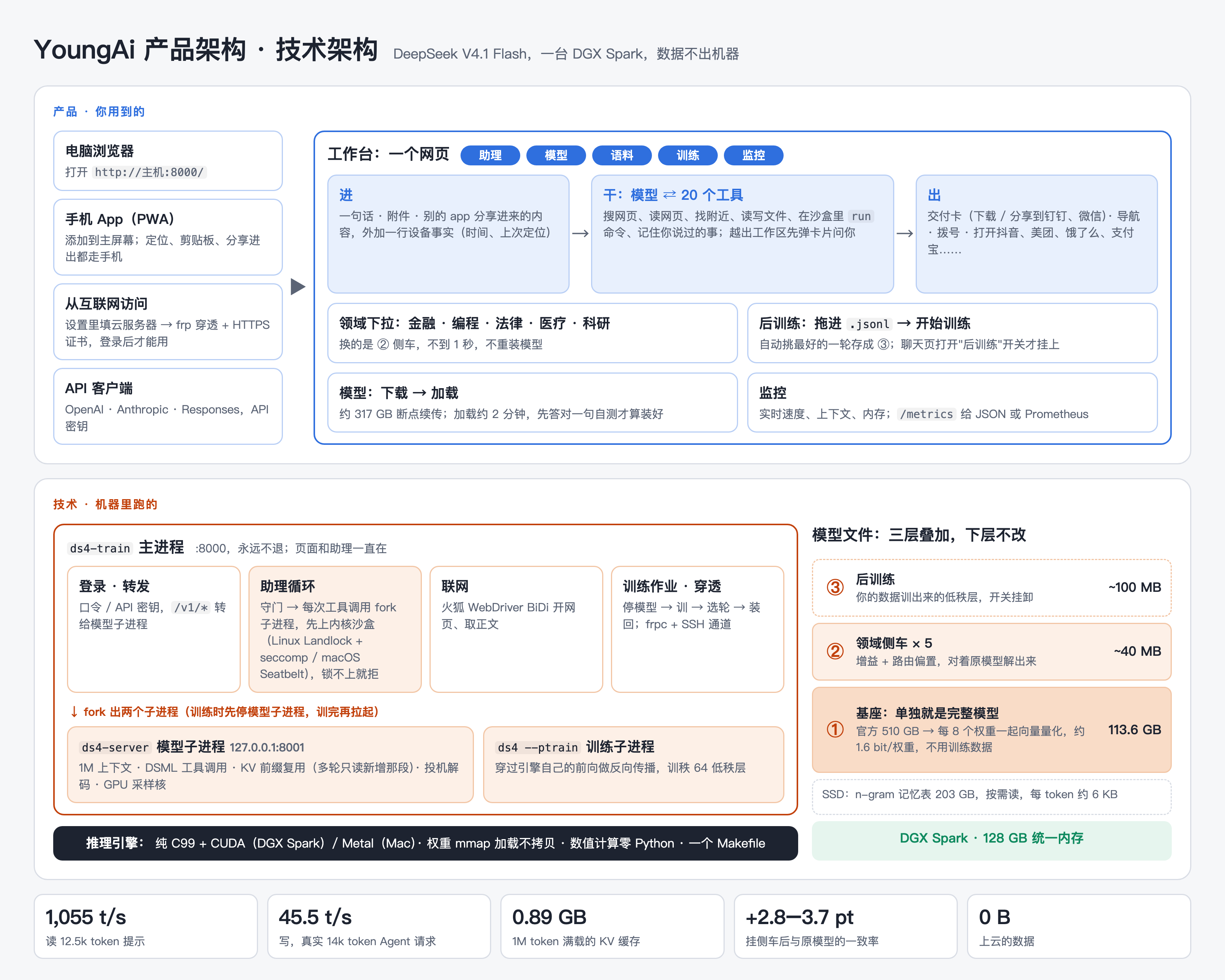
510 GB 的前沿模型,装进一台 128 GB 的机器
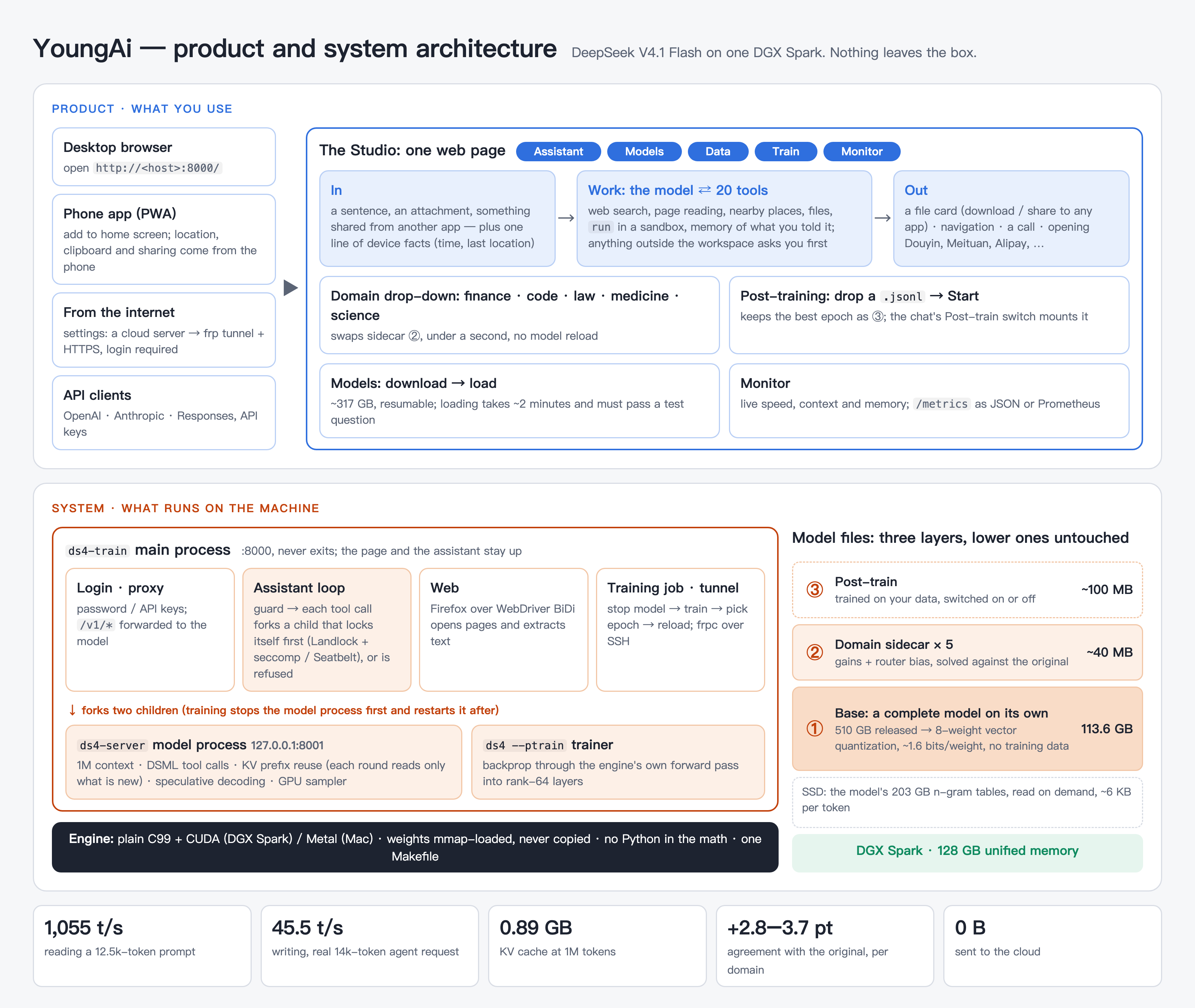
A 510 GB frontier model on a 128 GB machine
DeepSeek V4.1 Flash 原样发布是 510 GB。我们自己写的推理引擎(纯 C99 + CUDA / Metal,一个 Makefile)把它压到 113.6 GB,跑在一台 DGX Spark 上。
DeepSeek V4.1 Flash is 510 GB as released. Our own inference engine (plain C99 + CUDA / Metal, one Makefile) shrinks it to 113.6 GB and runs it on one DGX Spark.
| 项Item | 数Number | ||
|---|---|---|---|
| 体积 | Size | 官方 510 GB → 基座 113.6 GB(每 8 个权重一起向量量化,约 1.6 bit/权重,不用训练数据) | 510 GB → 113.6 GB base (8 weights vector-quantized together, ~1.6 bit/weight, no training data) |
| 读提示 | Reading | 1,055 token/s (12.5k token 提示)(12.5k-token prompt) | |
| 写回答 | Writing | 45.5 token/s (真实 14k token Agent 请求,投机解码开)(real 14k-token agent request, speculative decoding on) | |
| 上下文 | Context | 1M token · 满载 KV 缓存 0.89 GB· full KV cache 0.89 GB | |
| 领域侧车 | Domain sidecars | 金融 / 编程 / 法律 / 医疗 / 科研,各约 40 MB;挂上后与原版全精度模型下一个字的一致率高 2.9–3.7 个百分点 | finance / code / law / medicine / science, ~40 MB each; next-token agreement with the full-precision original rises 2.9–3.7 points |
测法和完整结果表:技术细节。
Method and full tables: technical notes.
三条命令,然后打开浏览器
Three commands, then open a browser
需要一台 DGX Spark(Linux aarch64 + CUDA 13 运行库,SSD 空闲约 320 GB)。上网工具要火狐,Spark 上的 Ubuntu 自带。
You need a DGX Spark (Linux aarch64 with the CUDA 13 runtime, ~320 GB free SSD). The web tools need Firefox, which Ubuntu on the Spark ships.
- 第一次打开页面,先设一个用户名和密码。
- The first visit asks you to set a username and password.
- 模型页点"下载"(约 317 GB,断点续传),再点"加载"(约 2 分钟)。
- On Models, press Download (~317 GB, resumable), then Load (~2 minutes).
- 助理页,直接说话。
- On Assistant, just talk.
git clone https://github.com/fodelf/YoungAi.git ~/ds4-main
cd ~/ds4-main
make cuda-spark
./ds4-train --host 0.0.0.0 --port 8000
# → http://<host>:8000/